Home / Portfolio / Clipper AI Video Editor

Clipper AI Video Editor

ClientPersonal Project
RoleProduct Designer, UX/UI (self-initiated)
Timeline6 weeks, self-directed concept
ToolsFigma
AIUI/UX

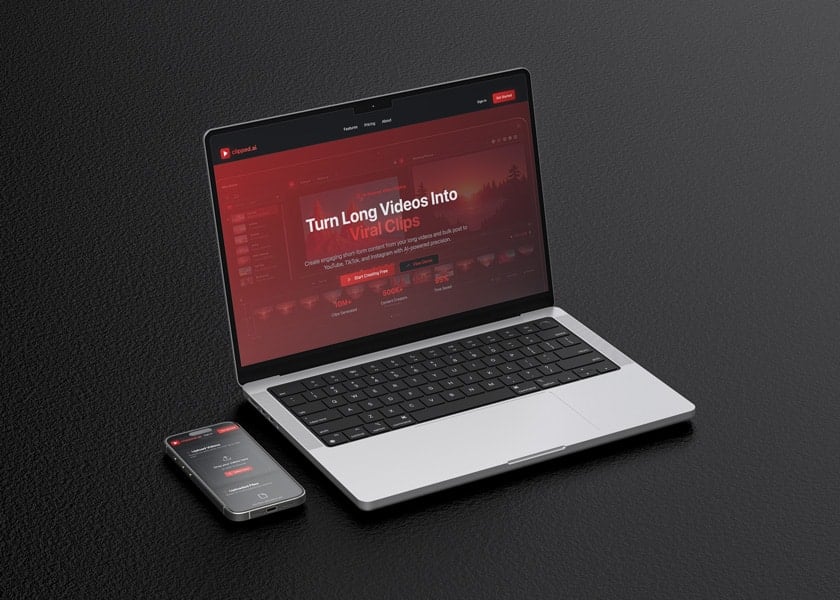
An AI video editor that turns long footage into scroll-stopping shorts and pushes them everywhere at once.

3Target platforms
Self-initiatedProject type
FigmaDesign & prototype
AI-nativeEditing workflow

The Challenge

Creators sit on hours of long-form footage but live and die by short-form. Turning one podcast, stream, or talk into a steady feed of clips means scrubbing the timeline for the best moments, re-cutting each one, reframing it for a vertical screen, and then uploading the same set of files three separate times to three separate apps. The manual version of this work is slow, repetitive, and easy to abandon, which is exactly where most long-form creators lose their short-form presence.

The design challenge was less about adding AI and more about making it trustworthy. An editor that silently decides what to cut feels like a black box; creators need to see why a moment was chosen and keep the final call. Clipper had to compress a multi-tool, multi-platform routine into a single flow, import, clip, format, publish, while still giving the creator visible control at every step, so the automation reads as an assistant rather than a replacement.
Approach

  1. Map the creator's real workflowTraced the end-to-end path a creator takes today, long recording, moment-hunting, per-clip editing, reformatting, and repeated uploads, to find where the friction actually lives and what a single tool would need to absorb.
  2. Design the AI clip surfaceBuilt the core screen where a long video becomes a set of proposed shorts, framing AI suggestions as editable starting points rather than finished exports so the creator stays in charge of the cut.
  3. Model multi-platform publishingTreated YouTube, TikTok, and Instagram as one destination set instead of three chores, designing a bulk flow that formats and queues clips for all three from the same source.
  4. Establish the visual system in FigmaCreated a consistent component library, timeline, clip cards, queue, and scheduling views, so the editor, publishing, and planning surfaces feel like one product.
  5. Prototype and pressure-test the flowWired the screens into an interactive prototype to validate that import-to-publish held together as a continuous story, then tightened states and transitions where the flow lost momentum.

Key Features

AI clip detection

Surfaces the strongest moments inside a long recording, so a full video arrives as a set of ready-to-post shorts instead of raw footage.

Timeline editor

A focused editing surface for trimming, reordering, and fine-tuning each generated clip before it ships out.

Multi-platform formatting

Reframes and previews every clip for YouTube, TikTok, and Instagram from a single source, so vertical and horizontal are handled in one place.

Bulk publishing queue

Batches clips across all three platforms in one action rather than exporting and uploading each file one at a time.

Scheduling calendar

Plans when each clip goes live, keeping a creator's posting cadence consistent without manual reposting.

AI precision controls

Keeps the human in the loop with adjustable settings, so automated cuts stay under the creator's direction.

Automation earns trust when the creator can still see and change every decision it makes, the AI proposes, the person disposes. Chris Cooper, design rationale

Results

  • A complete UI concept for an AI short-form workflow, carried from video import through clip editing to multi-platform publish.
  • A unified Figma visual system spanning the editor, publishing queue, and scheduling surfaces as one coherent product.
  • A publishing model that frames YouTube, TikTok, and Instagram as a single destination set rather than three separate uploads.
  • An interaction pattern that keeps AI suggestions editable, prioritizing creator control over hands-off automation.

Strategy

  • Framed the core job: turn one long video into many platform-ready shorts
  • Prioritized bulk, multi-platform publishing over single-clip export
  • Positioned AI as an assistant the creator directs, not a black box

Design

  • End-to-end flow from video import through clip editing to scheduled publish
  • Consistent component system across editor, queue, and calendar views
  • Vertical-first framing to suit TikTok and Instagram short-form
  • Clear preview and suggestion states so creators trust each clip before posting

Tools

  • Figma, UI design, component library, and interactive prototyping
Back to All Projects Get in Touch